


Cloudflare account: free hosting for your website
Your website will run on your own free account. The website and its data belong to you from day one.
Added:
What is Cloudflare?
Website hosting, protection against attacks and SSL certificates, fast and secure.
- On the market since 2009, listed on the New York Stock Exchange since 2019.
- A network of servers in 335 cities in more than 125 countries.
- Handles about 20% of the whole internet.
Why do we choose Cloudflare?
- The free plan is enough for a company or project website.
- Your website loads fast, because it runs from the server closest to the visitor.
- The SSL certificate and protection against attacks are included at no extra cost.
- The account is yours: the website and its data belong to you, even if you change contractors.
Why is Cloudflare free?
- Free sites help Cloudflare move traffic more cheaply: internet providers are keen to connect to its network, because a large part of the internet sits behind it.
- Cloudflare serves traffic from free sites with the spare capacity of its network.
- With so many sites on its network, Cloudflare spots new attacks faster, which also protects paying customers.
- Some people who start on the free plan later use paid Cloudflare services at work.
Check the source: Cloudflare blog on the free plan, as of October 13, 2026 (opens in a new tab)Check the source: Cloudflare plans, as of October 13, 2026 (opens in a new tab)
Work with AI
Pick an assistant. It opens with a ready prompt and walks you through this guide step by step.
 ChatGPT (opens a new tab with a ready prompt)
 Claude (opens a new tab with a ready prompt)
 Gemini (copies the prompt and opens a new tab, paste it into the chat)
 Perplexity (opens a new tab with a ready prompt)
Help me follow the guide “Cloudflare account: free hosting for your website” from PerfoState: https://perfostate.com/guides/cloudflare/ Open this page and read the whole guide. Walk me through it point by point: describe one step, wait until I say it is done, and only then move on. If the guide has several paths, first ask which one fits my situation. Do not guess steps that are not on the page. If you cannot open the page, say so directly. If something does not work or the screen looks different from the guide, check the official Cloudflare help (https://developers.cloudflare.com/) and tell me what changed. If I am still stuck, suggest contacting PerfoState: website https://perfostate.com/#contact. Never ask me for passwords. Answer in English, briefly and in plain words.
Names and logos belong to their owners. We are not affiliated with OpenAI, Anthropic, Google or Perplexity.
1Create an account
Go to dash.cloudflare.com/sign-up (opens in a new tab). Choose “Continue with Google” or enter an email and password, pass the short check and click “Sign up”.
2Complete the first setup
Answer a few starter questions. If you are asked to choose a plan, pick the free “Free” plan.
3Open the list of people on the account
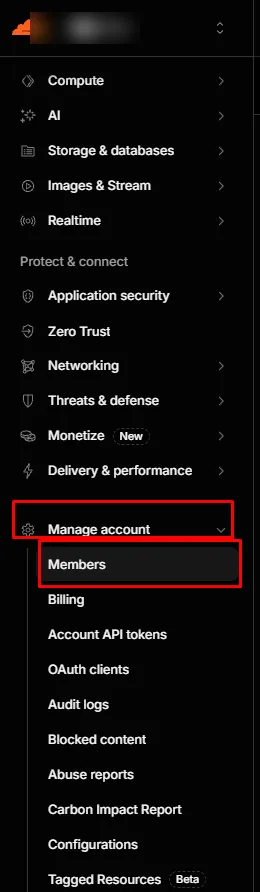
Open the member list of your Cloudflare account (opens in a new tab) or, in the menu on the left, expand “Manage account” and choose “Members”.
4Invite us
Click “+ Invite members”.

5Grant access
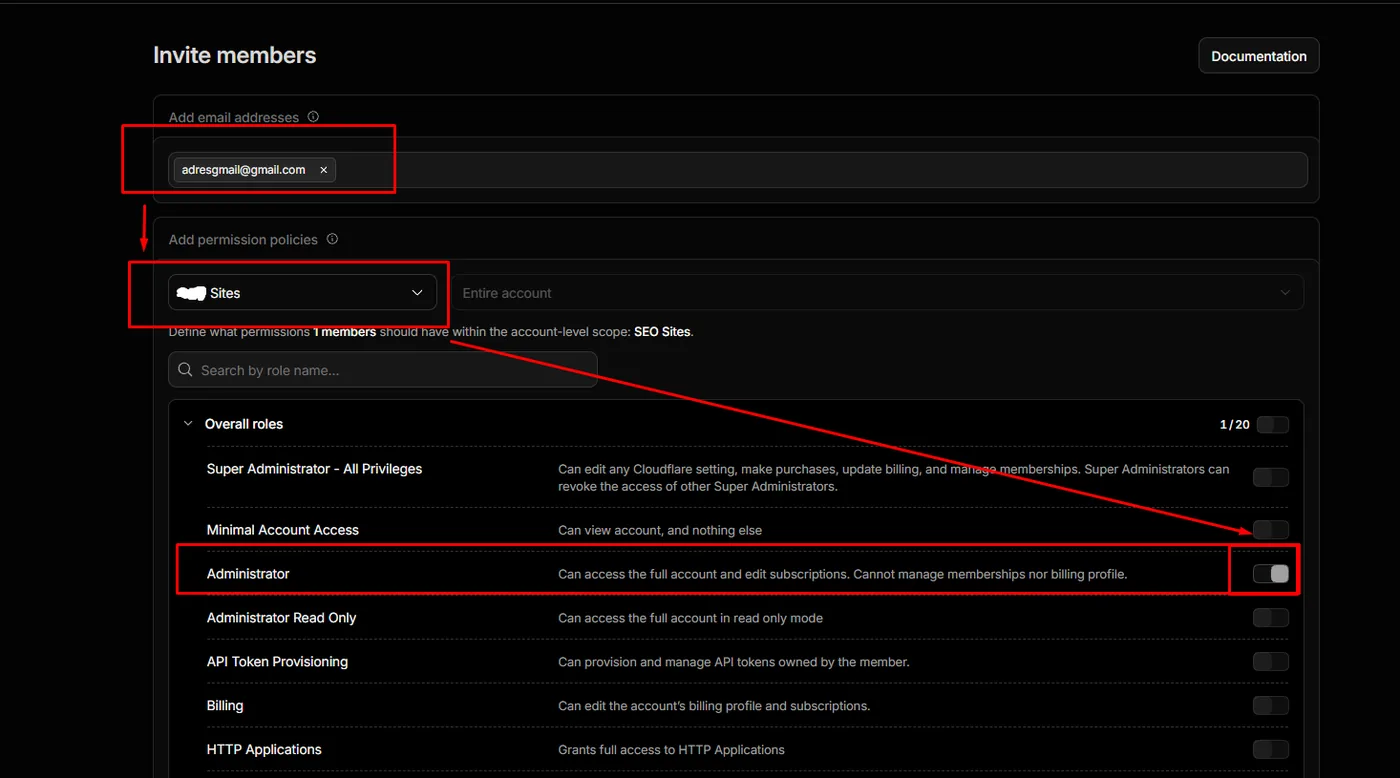
In “Add email addresses”, enter the address aleksander [at] rend.pro. In “Add permission policies”, choose your account and turn on the “Administrator” role.
6Confirm
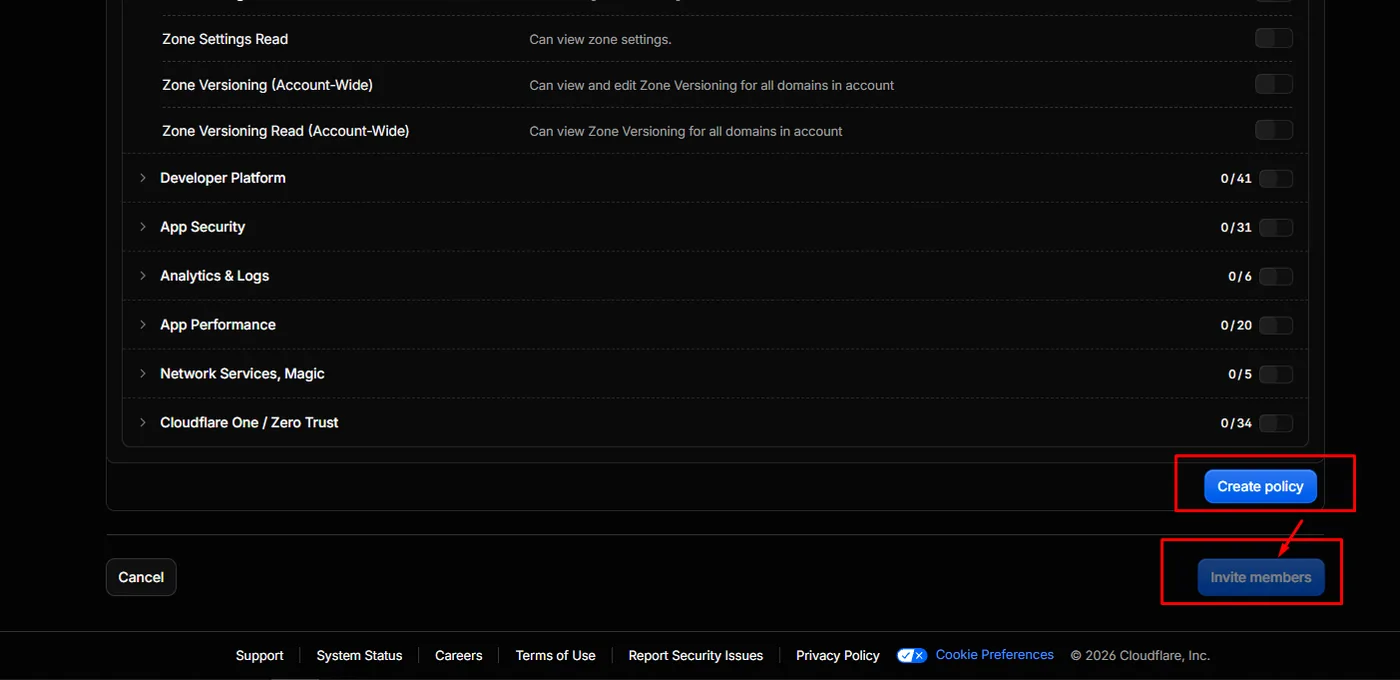
Click “Create policy”, then “Invite members”.
Has the invitation for us been sent yet?
No rush. Go back to the list of steps or email us: we’ll go through it together.
Done. The “Administrator” role lets us publish and maintain the website, but gives no access to payments or to managing people on your account.
Questions about hosting
Does the hosting have automatic backups?
Yes. Cloudflare keeps every published version of the website. If something goes wrong, we go back to the previous version in minutes. We also keep a copy of the website files. Messages from the form go straight to your email, so they are not lost with the website.
Is there an SSL certificate?
Yes, free of charge. Cloudflare issues and renews the SSL certificate itself, so your website shows the padlock next to the address and the connection to it is encrypted.
Does the website need technical updates?
Do I get admin support?
Yes. Setting up the account, domain and form, and publishing the website, are included in the website price. After that we help as part of ongoing care or as one-off work. The account belongs to you, and we are your first contact for anything technical.